Anúncios
The Essential Guide to QR Code Creation, Scanning, and Real-World Uses
Quick Response (QR) codes have become an everyday part of how people access information, make purchases, and interact with digital content. This guide outlines essential knowledge and techniques for effectively creating, scanning, and applying QR codes in various contexts.
Understanding QR Codes: The Basics
QR codes are two-dimensional barcodes that store information in a compact square pattern. They can encode text, links, contact information, payment data, and other details readable by smartphones and scanners. Unlike traditional barcodes, QR codes can hold much more data and work from multiple angles.
Most modern devices, including smartphones and tablets, can scan QR codes directly using the built-in camera. Specialized scanning apps offer advanced features for frequent users, but for everyday needs, most camera apps will suffice. QR codes eliminate the need to type long URLs or contact details by hand.
QR codes have found a place in advertising, events, food packaging, public transport, retail, payments, and personal connections. Their versatility is owed to how easily they bridge the physical world and digital content with a quick scan.
How QR Codes Work
Understanding the structure of QR codes helps in deciding which solution best suits a task. A QR code consists of black modules arranged in a square. It features finder patterns for alignment, as well as encoding regions to store data. Encoding is robust enough that even partly damaged codes may remain scannable.
Here’s how information is delivered in a typical QR code:
- Data is converted into binary and arranged in modules on the code.
- Scanner identifies the alignment patterns to decode orientation.
- Embedded error correction allows scanning even with some obstruction.
- The data is interpreted and shown or acted upon by your device.
Due to their design, QR codes work accurately under variable lighting conditions and on most flat surfaces. This flexibility unlocks practical uses across industries and everyday life.
Choosing the Right QR Code Generator
A reliable QR code generator is key to an effective QR code campaign or project. The market includes both free and paid QR code generators. Deciding factors include flexibility, feature set, support for dynamic codes, and options for tracking usage.
| Feature | Free Generators | Paid Generators |
|---|---|---|
| Static QR Codes | Yes | Yes |
| Dynamic QR Codes | No / Limited | Yes |
| Analytics | No | Yes |
| Design Customization | Basic | Advanced |
| Data Management | No | Yes |
If you need quick, one-off codes (like a Wi-Fi password for a party), a free generator suffices. For business, events, or marketing use, paid solutions provide important benefits—like device usage stats, editing linked URLs after print, and branding options.
Static vs. Dynamic QR Codes: Comparison and Use Cases
The main decision when making a QR code is whether to use a static or dynamic version. Each fits different use cases and pros and cons.
- Static QR Codes: Encode content directly. Once created, their destination (e.g., a link) can’t be changed. Work well for simple, unchanging information: menus, event dates, Wi-Fi network access.
- Dynamic QR Codes: Encode a short link that redirects to another URL. The creator can change destination details at any time, even after printing. Fit for marketing campaigns, product info, event schedules, and usage tracking needs.
Dynamic QR codes also enable more branding, usage analysis, and easier management across several campaigns. However, they require you to register or use paid platforms, while static codes are easy to make yourself with no ongoing service.
Steps to Create a QR Code
Making a QR code is straightforward. Below are practical steps to ensure each QR code is accurate and fit for its purpose:
- Choose a reputable QR code generator based on your project’s needs (static or dynamic, customization, analytics).
- Select the content type: website URL, phone number, plain text, contact info, Wi-Fi credentials, app link, calendar event, or other supported types.
- Enter the content carefully and double-check for accuracy.
- For design or branding, choose color, shape, and add a logo if available (keep high contrast for readability).
- Generate the QR code and preview it—scan with different devices to check function.
- Download the right format: PNG and SVG work for most printed and digital uses.
- Test final printouts or displays in real-world conditions (different phone types, lighting, and connection quality).
For repeated business use, keep a record of all codes created and their assigned destinations to avoid confusion or overlap in the future.
Scanning QR Codes: Methods and Best Practices
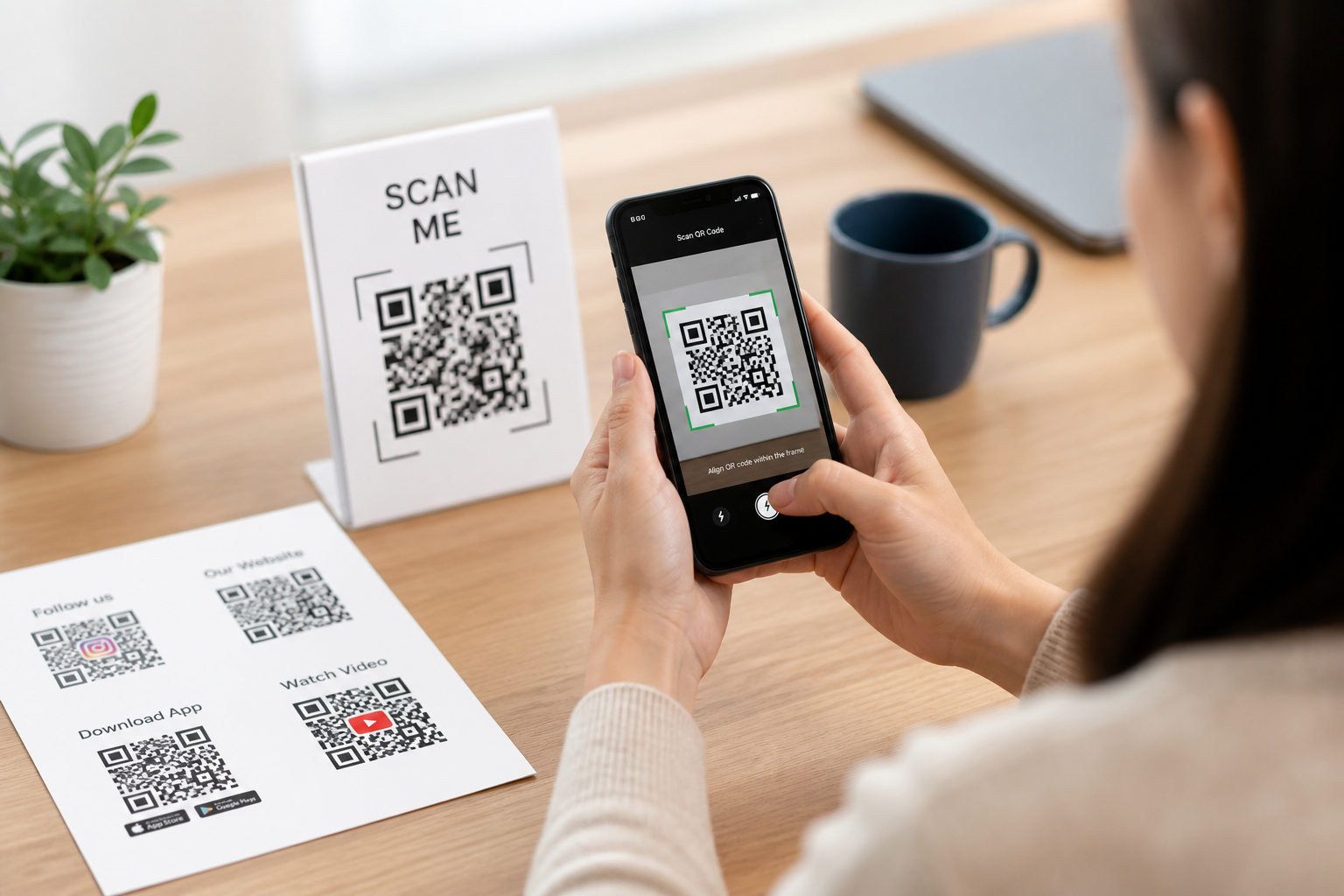
Scanning a QR code is usually as simple as opening your smartphone camera and pointing it at the code. For extra features—like bulk scanning, text extraction, or manual history—dedicated apps are available for free or low cost.
Here’s how most QR scanning works step-by-step:
- Open the camera app on your smartphone or tablet.
- Point the camera so the code fits within the on-screen frame.
- Wait for a notification or pop-up to appear—this is usually instant.
- Tap the notification to open the link or content securely.
If a code won’t scan, check brightness, camera cleanliness, distance, or whether the code is damaged or distorted. For printed codes, larger sizes scan more reliably in crowded or outdoor settings.
Practical Business Uses for QR Codes
Companies of all sizes use QR codes to speed up processes, connect with customers, and bridge physical and digital marketing. Typical business uses include product packaging, interactive posters, payment facilitation, event check-ins, and marketing campaigns.
- Product Packaging: Provide instant information about ingredients, sourcing, or care instructions. QR codes on boxes link to detailed guides, manuals, or warranty info.
- Staff Management: For time tracking or secure access, QR entry passes streamline employee check-in and replace physical cards.
- Event Registration: QR codes on tickets (digital and paper) allow quick verification and real-time update of attendee rosters without manual entry.
- Customer Feedback: Receipts with a QR code invite reviews or support requests, increasing response rates and allowing faster feedback cycles.
- Payments: Digital or print QR codes enable instant mobile payments at cash registers, markets, pop-up shops, or transport terminals with less hassle than cash.
Businesses can use analytics from dynamic QR codes to test the effectiveness of campaigns, time of day trends, or regional engagement—allowing data-driven decisions for future efforts.
Personal and Everyday QR Code Applications
QR codes make everyday tasks easier at home, with friends, or while running errands. People use them to share information without keyboards, organize homes, or access resources quickly.
- Wi-Fi Sharing: Post a QR code on the wall with network credentials—guests scan to connect, eliminating the need to read and type complex passwords.
- Contact Sharing: Put a QR code on business cards to share phone numbers or social media profiles with a two-second scan.
- Emergency Info: Parents or caregivers place medical info as a QR code on a keychain or bag for use if special care is needed.
- Inventory: Keep a QR-coded list on storage bins or toolboxes. Scan to view inventory details or maintenance logs.
- Instructions and Reminders: Place QR codes linking to helpful videos, to-do lists, or tutorials on appliances, recipe cards, or kids’ projects.
Personal QR code use can be creative and highly practical: from sharing playlists at parties to providing quick access to event details, the uses are limited only by imagination and need.
QR Code Safety and Security Checks
While QR codes are convenient, they can also present safety risks when used carelessly. Malicious codes might redirect to phishing sites or trigger unwanted actions (such as connecting to unsafe networks).
Reduce risks by following these steps:
- Only scan QR codes from trusted sources—stick to codes in professional environments or reputable communications.
- Always check the previewed link before tapping. Most devices will show a URL or action prompt before completing.
- Be wary of codes on public posters, stickers in random places, or codes that look tampered with or out of place.
- Use a QR scanning app with built-in security, which can flag suspicious or known malicious redirects.
- For payments, confirm with staff or a secure website before scanning a payment-related QR code.
If you manage published QR codes, keep track of versions and where they’re posted. If a link destination changes or should be revoked, update dynamic QR codes or remove access to outdated static codes.
Always keep your device’s system, browser, and security features updated to safeguard against newly discovered risks in QR scanning technologies.
Enhancing QR Codes with Customization
Customizing QR codes increases brand recognition and user trust. More advanced QR code generators allow you to adjust color, shape, or add a logo. When well-designed, custom codes draw attention and improve engagement.
Follow these guidelines for effective QR code custom designs:
- Maintain high contrast between the code and background—light backgrounds with dark codes scan best.
- Avoid filling in the “quiet zone” (the margin around the code).
- Keep logos or images centrally positioned, not covering finder patterns in code corners.
- Test heavily customized codes on multiple devices for scannability before distribution.
Creative QR code use might include branded restaurant menus, artistic gallery guides, or even event wristbands. Customization also discourages tampering, since altered codes are immediately more obvious against branded designs.
QR Code Management for Ongoing Projects
When running multiple QR code campaigns, organization prevents confusion and lost data. Especially for businesses or educators, a system ensures codes are correctly used and updated over time.
Tips for QR code management:
- Document the context and content linked to each code. Use a spreadsheet or digital tool to track status.
- For dynamic codes, regularly check analytics and update linked content to keep it current and useful.
- Assign version numbers or expiration dates to physical codes at events or with products, so old info isn’t reused inadvertently.
- Periodically audit public codes for accuracy, active links, and relevance. Remove or update anything outdated.
- Organize codes by campaign type, location, or project for easy retrieval (e.g., events, internal tools, customer support).
Effective management saves time and enhances user trust by ensuring every scan provides accurate, expected information.
Comparing QR Code Use in Different Scenarios
Use cases for QR codes vary significantly between industries and personal scenarios. Choosing the right approach improves outcome and reduces friction. Here are common scenarios and suggestions:
| Scenario | Best QR Code Type | Key Considerations |
|---|---|---|
| Restaurant Menus | Dynamic | Update links for seasonal changes, ensure scannability in dim settings |
| Event Check-Ins | Dynamic | Track attendee usage; opt for codes that expire after event |
| Personal Wi-Fi | Static | Simplicity for private/home use, single-use QR generation |
| Marketing Campaigns | Dynamic | Change links as products or promotions evolve; track engagement |
| Contact Sharing | Static | Use vCard format for direct import to address books |
For rare or one-time needs, static QR codes are simple and cost-effective. Where content or destination may change, or tracking is essential, dynamic codes offer adaptability and data insights.
Future Trends in QR Codes
While the QR code’s design has remained largely the same, new uses continue to appear. Trends include integration with payment systems, secure log-ins, health record access, and personalized shopping experiences.
- Integration with touchless payments—more platforms are encouraging QR-based payments for speed and hygiene.
- Multi-use event passes—one code can now trigger location check-in, guest information access, and feedback forms.
- Accessibility enhancements—QR codes that link to audio guides, subtitles, or translations for universal access.
- Privacy-respecting codes—more services offering time-limited or one-time-use QR codes for secure transactions.
- Large-scale logistics—QRs simplify tracking parcels, tools, or medical samples with minimal manual intervention.
Open standards and improved smartphones keep QR codes simple, but expect more sophisticated analytics, customization, and safety layers as demand grows.
Common QR Code Missteps and How to Avoid Them
Several frequent mistakes can reduce the effectiveness of QR code efforts. Being aware of these pitfalls helps you ensure your QR strategy delivers the intended results.
- Using low-contrast colors leads to scanning failures. Ensure readability by sticking to dark codes on light backgrounds.
- Printing too small for the expected scanning distance—minimum size should be at least 2cm by 2cm for handheld devices.
- Placing codes in hard-to-reach or poorly lit locations makes scanning difficult—favor eye-level and well-lit areas.
- Linking to non-mobile-optimized websites frustrates users trying to view on their phones. Test your link destinations.
- Forgetting to test codes on both iOS and Android devices can expose platform-specific issues.
- Omitting clear instructions near the code leaves some users guessing. A simple label (e.g., “Scan to view menu”) helps all audiences.
Run a checklist review for every QR code project: contrast, placement, target URL functionality, and test scanning with at least two different devices. With careful planning, your QR initiative will be user-friendly and reliable.
- Enable multiple contactless options to serve varied devices.
- Trigger AR features or virtual tours with a single scan.
- Connect QR scans to cloud-based systems for real-time data updates.
- Improve event or inventory tracking by linking QR to location services.
By thoughtfully combining QR codes with other technologies, you expand reach and usability, creating seamless experiences that adapt to diverse user needs and evolving digital habits.
Such integrations are also common in logistics and inventory management. QR codes can handle static data, while real-time updates or asset verification leverage cloud databases accessed via unique code scans. Linking QR codes to Bluetooth beacons makes tracking assets’ physical locations easier, especially in large venues or distributed sites.
For example, pairing QR codes with NFC tags in a retail environment gives users multiple contactless options for accessing information or offers—accommodating those whose devices may not scan QR codes, but support NFC. Similarly, AR experiences can launch via a scanned QR code, delivering interactive product demos or 3D content directly to the user’s device.
While QR codes are powerful, they often work best when paired with complementary technologies. Consider enhancing customer experience by combining QR codes with Near-Field Communication (NFC), Bluetooth beacons, or even augmented reality (AR). These hybrid approaches can make interactions frictionless and more engaging.
Combining QR Codes with Other Technologies
Understanding the strengths and limitations of each content type allows you to choose the best fit for your use case. For example, if you want users to save your business contact details, a vCard QR code is ideal, but if quick redirection to a website is the goal, a simple URL QR code keeps things fast and efficient.
| Content Type | Common Uses | File Size Impact | Ideal Scenarios |
|---|---|---|---|
| URL | Link to websites, landing pages, forms | Very low—fast scanning and decoding | Marketing, events, surveys |
| Plain Text | Short messages, promo codes, instructions | Low—scanned quickly | Quick notes, serial numbers |
| vCard | Share contact details instantly | Moderate—may increase QR complexity | Business cards, networking events |
| Wi-Fi Credentials | Auto-connect to Wi-Fi networks | Moderate—information-dense | Offices, cafés, events |
| Email / SMS | Auto-fill messages or contacts | Low—typically short data | Customer service, promotions |
QR codes are highly versatile—they can store different types of information and trigger a range of actions when scanned. The following table compares some of the most common QR code content types, highlighting practical uses, typical file sizes, and recommended scenarios.
Comparing Popular QR Code Content Types
- Use high-contrast color combinations for code and background.
- Ensure minimum code size of 2 x 2 cm for most scanning apps.
- Offer a short, easy-to-read backup link next to each code.
- Test with screen readers and various device cameras for compatibility.
It’s also a good practice to provide an alternative means of access wherever you use QR codes. For example, display the underlying URL in text nearby, or offer NFC tags for tap-to-connect capabilities alongside QR codes for those who may struggle with scanning. These steps help ensure that your content and services remain open to all your users.
To maximize accessibility, make sure QR codes are large enough to be easily scanned and feature adequate color contrast against their background. Avoid placing codes in areas with glare, reflections, or poor lighting, as this can make scanning difficult for everyone, not just those with visual challenges.
Ensuring your QR codes are accessible to all potential users—including those with disabilities—is crucial for inclusive design. Not everyone interacts with technology in the same way, and QR code deployment can sometimes unintentionally exclude users with visual impairments, mobility limitations, or those who lack compatible devices.
Accessibility Considerations with QR Codes
Ultimately, strategic QR code integration should feel natural to users and offer a clear payoff—such as reducing effort, eliminating errors, or providing instant access to needed information.
- Audit your current processes to spot repetitive manual tasks.
- Select key interactions where QR codes deliver immediate benefits.
- Test your QR code implementation with a small group before wider rollout.
- Monitor user feedback and adjust placement for better engagement.
For businesses, embedding QR codes within printed documents, packaging, or at physical checkpoints can automate data entry, feedback collection, or access to digital resources. In personal tasks, using QR codes for quick Wi-Fi sharing, organizing links, or managing event RSVPs often reduces friction and paper waste.
Introducing QR codes into your daily operations or personal routines can streamline processes and boost convenience. However, successful integration depends on thoughtful planning to ensure QR codes complement—not complicate—your workflow. Start by identifying bottlenecks or manual steps where QR code usage could save time, such as logging into systems, sharing contact data, or processing payments.
Integrating QR Codes into Existing Workflows
Consistent measurement not only maximizes the effectiveness of your QR strategies but also helps justify future investments and demonstrates ROI to stakeholders.
- Track scans and unique visitors regularly
- Compare performance across locations or campaigns
- Monitor for unusual activity (potential security issues)
- Adjust content or placement based on user data
To get the most out of your QR code monitoring, establish a routine to check analytics and compare with your goals. Integrating QR code data with broader marketing tools (like Google Analytics) allows for even deeper insights into conversion rates and user journeys. Be sure to comply with privacy regulations and inform users when data is being collected.
Tracking how often your QR codes are scanned and analyzing the resulting user behavior is crucial for optimizing campaigns and understanding engagement. Most dynamic QR code platforms provide built-in analytics that can show scan counts, locations, times, device types, and referral sources. By regularly reviewing these metrics, you can refine your content, reposition QR codes with poor engagement, or update call-to-action language to boost results.
Monitoring and Measuring QR Code Performance
Editorial note: This guide provides a thorough overview of QR code creation and usage for personal and business benefits—always adapt these tools according to your individual context and stay updated on best practices.